
WildGirl-Feel the Unexpected
Auction PointEntertainment
4.7716.00 Reviews
- Version
- 1.8.6
- Installs
- 100.00K
- Age Rating
- Mature 17+
Screenshots



Our Review of WildGirl-Feel the Unexpected
 Analysis by Appyee
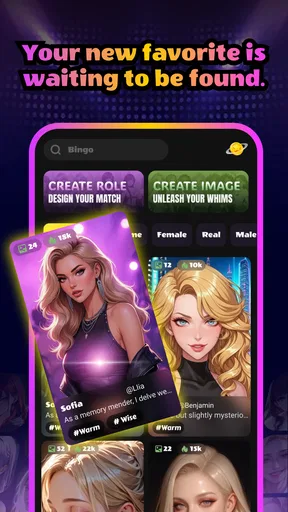
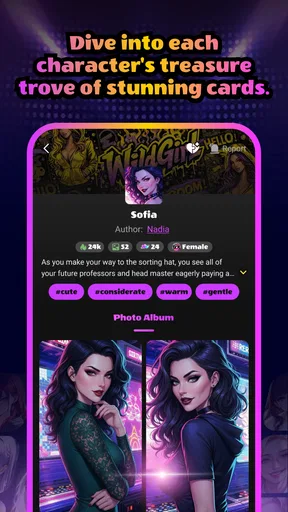
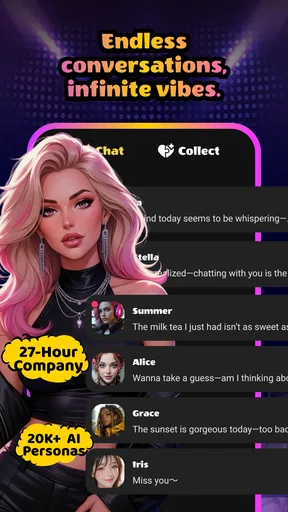
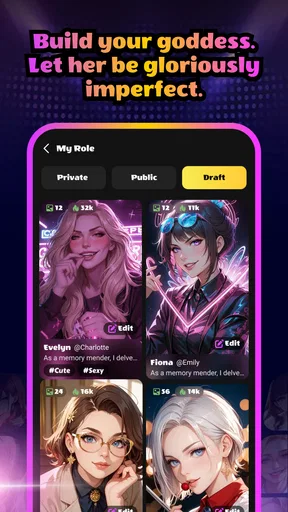
I approached WildGirl-Feel the Unexpected as an entertainment app for people who enjoy building fictional personalities and chatting with them in different moods. Its central idea is simple, but the quality of the experience depends heavily on how deliberately you shape a character and how you guide a conversation. After spending time with it, I see it less as a passive feed and more as a small creative workspace where the user supplies the direction.
The app is developed by Auction Point and is available free of charge, although optional purchases range from $3.49 to $54.99 per item. It is rated Mature 17+, which is important before anyone installs it for a younger user or assumes it is a general family-chat application. On the Android side, it supports version 7.0 and later. The release shown for the app is version 1.8.6, and its entertainment focus is clear from the first session: the point is not productivity, messaging with real contacts, or factual research, but imaginative conversation.
What makes it appealing is the freedom to try very different conversation styles without switching between unrelated apps. You can create a character for light roleplay, a dramatic exchange, a playful improvisation, or a more reflective conversation. The best results come when I treat each character as a defined voice rather than simply typing a name and expecting a complete personality to appear automatically.
Building a reliable everyday workflow
I use this section to focus on making a session easy to resume, not just enjoyable in the moment. A small note of the character’s goal and the scene’s current turning point can help me restart with a purposeful prompt, especially when I want to continue an idea after a break. The next section looks at the habits that keep those sessions clear without overloading the character setup.
Start with one clear character idea
My most useful starting habit was to avoid making a character description too broad. A vague idea such as “funny and mysterious” gives a conversation somewhere to begin, but it does not give the character enough consistency to remain interesting. I had better results when I decided what the character wanted, how that character normally spoke, and what kind of interaction I expected from the session.
That does not require writing a long biography. In fact, a short, focused concept is easier to manage. I might define a confident storyteller who answers with teasing comments, or a cautious companion who asks questions before giving advice. The important part is choosing a few traits that work together. If every possible personality trait is added at once, the conversation can feel less distinctive because there is no clear center.
This is one of the first differences between WildGirl and a conventional entertainment chat or social app. Ordinary alternatives usually give me a fixed stream, a fixed cast, or conversations with people I already know. Here, the creative work happens before the chat becomes enjoyable. That extra step is also the reason the app can feel more personal when the setup is done carefully.
Use the first messages as direction, not filler
The opening exchange matters more than I expected. I found it useful to establish the situation immediately instead of spending several messages on greetings. A simple setup can include where the conversation is happening, what mood it should have, and what sort of response I want. For example, I can begin with a scene, a problem, or a question that gives the character something specific to react to.
When a response heads in the wrong direction, I get more value from calmly steering it than from abandoning the character straight away. Restating the tone or narrowing the subject usually works better than sending a long correction full of unrelated instructions. This is a repeatable habit: decide what changed, mention that one change, and continue the scene.
I also recommend keeping separate conversations for separate purposes. A character used for playful improvisation may not be the right place for a serious discussion, because mixing those moods can make later replies feel inconsistent. Starting a fresh thread for a new scenario gives me a cleaner baseline and makes it easier to judge whether the character itself is working.
A practical scenario for short breaks
For an everyday use case, imagine having fifteen minutes during a commute or a quiet break. Instead of opening the app without a plan, I would prepare a small prompt such as a mystery to solve, a fictional disagreement, or a scene that needs an ending. The character then becomes a partner in a focused activity rather than an endless source of random replies.
This approach is especially useful when I want entertainment that feels interactive but does not require the concentration of a full game. I can stop after a complete exchange, return to the same idea later, or change the tone when I want something lighter. The app works best in these compact sessions because the user remains responsible for giving the conversation a destination.
What the current audience suggests
The app has passed 100K installs and holds a 4.7 average from around 5.5K ratings, with roughly 716 written reviews. Those figures suggest that the concept has found an audience, but they should not be treated as a guarantee that every personality style will feel equally convincing. AI character apps are unusually sensitive to individual expectations: someone looking for free-form roleplay may enjoy the flexibility, while someone expecting a perfectly consistent fictional person may notice limitations quickly.
I would also pay attention to the Mature 17+ label before using it around children or recommending it as a harmless family activity. The category is entertainment, but the age guidance should shape how the app is shared and who is allowed to explore its conversations.
Settings and habits that make the experience smoother
I find that smoother conversations come from making one deliberate choice at a time: set the tone, give the character a situation, then adjust only what feels off. That keeps a correction from turning into a long list of competing instructions. I’ll also consider how to keep the experience comfortable and age-appropriate, before moving on to quicker methods for users who already know their preferred style.
Check the character setup before blaming the replies
The most valuable “setting” is the character definition itself. Before changing anything else, I review whether the description actually explains the behavior I want. A personality label alone is not enough. If I want concise replies, I say so. If I want questions instead of monologues, I make that part of the intended style. If the character should stay within a particular fictional situation, I establish that early.
This is not about trying to control every sentence. Over-directing the character can make the exchange stiff. I get a more natural result by defining the boundaries and leaving room for improvisation inside them. The trade-off is clear: more guidance usually improves consistency, while less guidance can produce surprising turns but also more drift.
Separate tone from subject
A useful adjustment is to think of tone and topic as two different controls. A conversation can be about a serious subject while still sounding playful, or it can discuss something ordinary in a dramatic voice. When a chat feels wrong, I ask myself whether the problem is the subject or the delivery. Changing both at once makes it difficult to know what fixed the issue.
For example, if the character is too formal, I keep the topic and request a warmer, more conversational style. If the replies are repetitive, I keep the personality but introduce a new situation. This small distinction saves time and produces more dependable results than repeatedly starting over without identifying the source of the friction.
Be deliberate with mature content
Because the app carries a Mature 17+ rating, I would approach its conversations with the same care I use for any adult-oriented entertainment product. I would not treat the character as a real person, and I would avoid sharing sensitive personal information simply because the chat feels private or friendly. The more immersive the interaction becomes, the more important it is to remember that this is a generated entertainment experience.
That point also affects expectations. A fictional character can sound supportive, but its replies should not replace qualified help for medical, legal, financial, or mental-health decisions. For those situations, a conventional specialist service is the better choice. WildGirl is strongest when the goal is imagination, conversation, and mood-based entertainment.
Understand the free-to-paid boundary
The app is free to install, but in-app purchases sit between $3.49 and $54.99 per item. I would therefore explore the basic experience first and decide whether the conversation quality and creative workflow justify spending money. The higher end of that range makes it especially important not to buy impulsively during an engaging session.
My preferred habit is to identify what I actually need before considering a purchase. If I am still changing characters every few minutes, paying will not solve the underlying problem. I first refine my prompts and settle on a repeatable style. Only after the free experience feels useful would I consider optional spending, and I would check the purchase screen carefully before confirming anything.
Faster patterns for experienced users
Once the basic workflow feels familiar, I can spend less time inventing a fresh setup and more time seeing where a scene goes. Reusable openings are useful as starting points, but I treat them as flexible prompts rather than scripts, so each character still has room to respond in its own way. The following section weighs that efficiency against the app’s practical limits.
Keep a small library of prompt openings
One of the easiest ways to reduce setup time is to maintain a few reusable opening patterns outside the app. I do not mean copying a single rigid script into every conversation. Instead, I keep short templates for different goals: starting a scene, asking for a debate, creating a mystery, or requesting a playful challenge.
A good template leaves blanks for the character, setting, mood, and immediate objective. That gives me a consistent workflow while preserving variety. It also makes comparisons fairer. If I am testing whether a new character is more engaging, I can use a similar opening rather than judging one character from a carefully prepared scenario and another from a rushed greeting.
Use a three-step correction pattern
When a reply misses the mark, I use a simple sequence. First, I identify the unwanted element, such as excessive seriousness or an answer that ignores the scene. Second, I state the preferred direction in one sentence. Third, I continue with a concrete prompt that gives the character something to do.
This works better for me than arguing with the response or repeating the same instruction several times. It keeps the chat moving and prevents the correction from becoming the entire conversation. It is also a useful way to distinguish a temporary detour from a deeper character problem. If the same issue returns repeatedly after clear guidance, the character concept may need to be simplified.
Give each session a finish line
Open-ended chats can become repetitive when neither side has a reason to conclude. I get more satisfying sessions by setting a small finish line: solve the riddle, reach a decision, complete the scene, or produce three possible endings. This turns the app into a sequence of manageable creative exercises.
The technique is particularly effective for users who enjoy roleplay but do not want to spend an entire evening maintaining one fictional world. A defined endpoint also makes it easier to return later with a new idea instead of dragging an old conversation past its best moment.
Compare it with ordinary alternatives honestly
Compared with watching videos or scrolling through social entertainment, WildGirl asks more from me but gives me more control over the direction. Compared with a conventional game, it offers less structured progression and fewer clearly defined objectives. Compared with messaging a real friend, it is available for fictional experimentation but cannot provide genuine human understanding or shared personal history.
That makes the app a good middle ground for people who want interactive amusement without committing to a large game. It is less suitable for someone who wants polished visual content, competitive systems, or a dependable factual assistant. Choosing it over those alternatives only makes sense when the appeal is conversation shaped by the user.
Advanced limits and where I would draw the line
I think experienced users benefit most from being clear about what they want the conversation to do—and what they should not expect it to do. Keeping fictional play distinct from real-world decisions helps preserve the fun without confusing an engaging exchange for dependable expertise. From there, I can make a more grounded call about whether this kind of interactive entertainment suits my habits.
Consistency is not the same as memory
The most important limitation is that a convincing character can still lose its thread. I would not build a long-running story on the assumption that every detail will remain perfectly stable. If a plot matters, I keep a short external note with names, relationships, goals, and important events. That note becomes a practical reference when I start a new conversation or need to bring the story back on course.
This extra step may feel unnecessary for casual chatting, but it becomes valuable for repeat users. It also reveals a trade-off: the app can support imaginative continuity, yet the user may need to provide some of the organization that a traditional story game handles automatically.
Surprise can become noise
The unexpected quality suggested by the app’s name can be entertaining, but surprise is not always improvement. A sudden tonal change may be welcome in improvisation and frustrating in a carefully planned scene. I learned to decide at the beginning whether I wanted unpredictability or control. Asking for a specific mood and objective reduces unwanted detours; leaving the prompt open creates more room for unusual turns.
This is why I would not recommend the app to someone who dislikes correcting AI-generated conversation. The experience rewards participation. If I want to press play and receive a finished story with no input, a video, audiobook, or traditional game is likely a better match.
Privacy-minded use is essential
Even in a fictional conversation, I avoid entering passwords, private contact details, confidential work information, or anything I would not want copied into an online service. The character may feel personal, but that feeling should not change basic digital hygiene. I also keep real names and identifiable details out of scenarios unless there is a clear reason to include them.
This advice is not a criticism unique to WildGirl; it is part of using conversational AI responsibly. The app is most enjoyable when I treat it as a creative tool, not as a secret diary or a substitute for a trusted relationship.
Who should skip it
I would skip this app if I wanted a family-friendly experience, a structured game with measurable progress, or a tool designed for reliable real-world answers. I would also hesitate if optional purchases could become difficult to control, because the price range makes casual tapping a poor strategy. Users who prefer fixed stories may find the freedom less exciting than expected.
On the other hand, people who enjoy inventing characters, testing dialogue styles, and turning a short prompt into an evolving scene are more likely to appreciate it. The app rewards curiosity, but it also rewards restraint: a focused character and a clear scenario usually beat a complicated setup filled with conflicting instructions.
My mastery verdict after settling into the workflow
WildGirl-Feel the Unexpected is at its best when I use it intentionally. The baseline workflow is easy to understand: create a character, establish a situation, guide the opening exchange, and give the session a small goal. The more advanced habits—separating tone from topic, keeping reusable prompt patterns, recording important story details, and correcting one issue at a time—make the difference between a forgettable chat and a genuinely engaging one.
Auction Point has positioned the app in a lively part of entertainment, where the user is both audience and director. The free entry point makes it approachable, while the optional purchases mean I would explore carefully before spending. Version 1.8.6 supports Android 7.0 and later, so the technical entry requirement is modest, but the Mature 17+ rating should remain part of the decision rather than an afterthought.
My honest recommendation is selective. I would suggest it to a friend who enjoys roleplay, fictional personalities, and conversational experimentation, especially someone willing to shape the experience instead of waiting for it to entertain them automatically. I would point that friend toward short, repeatable sessions and a clear character concept from the beginning.
I would not recommend it as a replacement for real companionship, professional advice, or a fully designed game. Its limitations become obvious when continuity, accuracy, or structured progression matters more than improvisation. But for a user who wants a flexible creative break and enjoys seeing how different prompts change the mood, WildGirl is a worthwhile entertainment app when used with clear boundaries and realistic expectations.
Verdict
Strengths of WildGirl-Feel the Unexpected
- Fast-paced gameplay keeps short sessions engaging.
- Unexpected events add variety and encourage repeated play.
- Simple controls make it approachable for new players.
- Distinctive visual style gives the game a memorable identity.
- Lightweight design may run smoothly on many mobile devices.
Limitations of WildGirl-Feel the Unexpected
- Some surprises may feel repetitive after extended play.
- Progression could seem limited for players seeking deep mechanics.
- The game may rely heavily on trial and error.
- Small-screen controls can occasionally feel imprecise.
- Content or features may vary between Android and iOS versions.
Similar Picks in This Category
View All
Google Play Games
Google LLC3.9

Netflix
Netflix, Inc.4.8

YouTube Kids
Google LLC4.2

Disney+
Disney4.4

Prime Video
Amazon Mobile LLC4.7

Steam
Valve Corporation3.2
Frequently Asked Questions
What is WildGirl – Feel the Unexpected?
WildGirl – Feel the Unexpected is an entertainment-focused mobile experience built around discovering unexpected moments, interactive content, and a playful visual style. Before downloading, users should review the store description carefully because the exact features, available sections, and supported devices may vary by version. The app’s appeal is mainly aimed at people who enjoy casual exploration and character-driven content rather than complex gameplay.
Is WildGirl – Feel the Unexpected free to download and use?
The application may be available to download at no initial cost, but users should check the current Google Play Store or App Store listing for the most accurate pricing information. Some versions of apps in this category can include advertising, optional purchases, subscriptions, or locked content. Review the payment details, subscription terms, and cancellation options before confirming any purchase, especially if children may access the device.
Is WildGirl – Feel the Unexpected safe for children?
Parents should not assume that the title or store screenshots provide a complete indication of suitability. Check the official age rating, content descriptors, privacy information, and user reviews before installation. The app may contain themes, images, language, advertisements, or links that are better suited to mature audiences. If a child will use it, parental controls and purchase restrictions are strongly recommended.
What permissions and personal information does WildGirl require?
Before installing WildGirl, examine the permissions shown on the official app store page and the developer’s privacy policy. Depending on the version, an app may request access related to notifications, device information, network connectivity, or analytics. Only grant permissions that are necessary for the features you want to use. Avoid downloading modified versions from unofficial websites, since they may collect extra data or contain harmful software.
What should I do if WildGirl does not work correctly?
If the app crashes, loads slowly, or fails to display content, first confirm that your Android or iPhone meets the listed requirements and has enough free storage. Update the app and operating system, then restart the device and check your internet connection. If problems continue, use the developer’s official support contact. Downloading from the legitimate store also makes updates, refunds, and troubleshooting more reliable.
